What Can Go Wrong
Most cable termination failures fall into a few predictable categories. Understanding these patterns will help you diagnose problems quickly — both in the simulator below and on the job.
✓ Correct T-568B Sequence (for reference)
↩️ Reversed Pair
The two wires within a single pair are in the wrong order — solid where stripe should be, and stripe where solid should be. For example, Orange in Pin 1 and White-Orange in Pin 2.
🔀 Transposed Wires
Two wires from different pairs are switched. For example, the solid Orange wire ends up where the solid Green wire should be, and vice versa. The tester will show two pins lighting up in the wrong positions.
🔀 Wrong Standard (T-568A)
The Green pair is in positions 1–2 and the Orange pair is in positions 3 and 6 — the T-568A pattern instead of T-568B. The cable will work for a straight-through connection, but it doesn't match the standard required for the job.
🔄 Crossed / Overlapping
Wires are not flat and parallel when inserted. Overlapping wires slip into the wrong channels inside the connector, causing pins to receive the wrong signal. Usually caused by rushing the arrangement step.
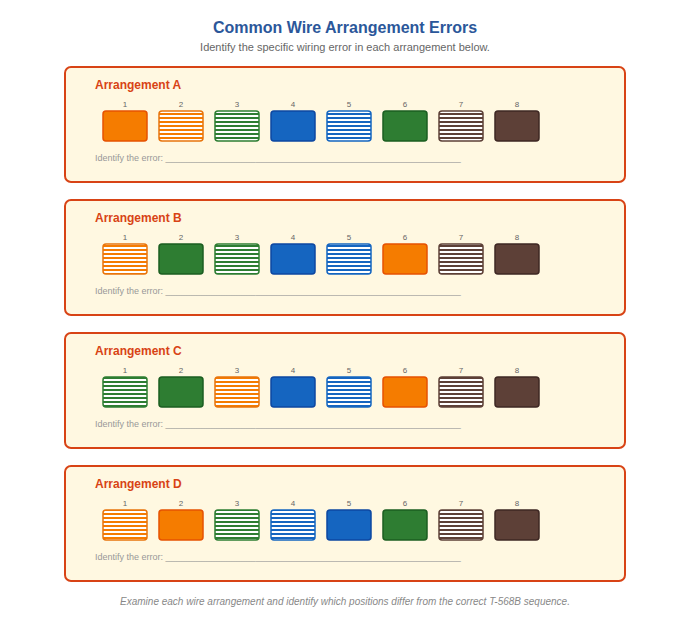
Common wiring errors compared to the correct T-568B arrangement. Study these patterns before attempting the troubleshooting activity.
Test the Connection
You've just crimped a cable and plugged it into the tester. Press Test to see the results, examine the wire arrangement, and diagnose what went wrong.
The cable tester is your best friend. Always test both ends of every cable before installing it. A two-minute test now saves hours of troubleshooting network issues later. On the job, keep a tester in your toolkit at all times.